How to Optimize Claude Code's Context Window (Without Just Buying a Bigger One)
The context window is the single most important resource you manage when working with Claude Code. Get it right and a long session stays coherent for hours. Get it wrong and you’ll watch the agent forget the constraint you mentioned twenty turns ago, repeat a mistake it already fixed, or quietly degrade until the output stops being useful.
Most of the advice flying around right now (bigger windows, more compaction, more subagents) is correct but scattered. This is the consolidated version, drawn from the way working developers are actually using Claude Code in 2026.
Bigger windows are not better windows
The 1M context window on Claude Opus 4.7 is a real upgrade, but it has changed less about day-to-day work than people expected. The consistent finding across recent write-ups is that context quality starts degrading well before the window fills, somewhere around the 40-50% mark. Past that, the model has more to attend to than it can usefully reason about, and the answers get worse even though you technically still have room.
That makes the window a quality budget, not a storage bin. Headroom is the thing keeping the model sharp. The right question is never “do I have space for this?” It’s “is this worth what it costs?”
Tactic 1: Watch where the tokens actually go
You can’t optimize what you can’t see. Claude Code’s /context command gives you a live breakdown by category (system prompt, tool definitions, memory files, skills, conversation history) so you can find what’s actually eating your budget.
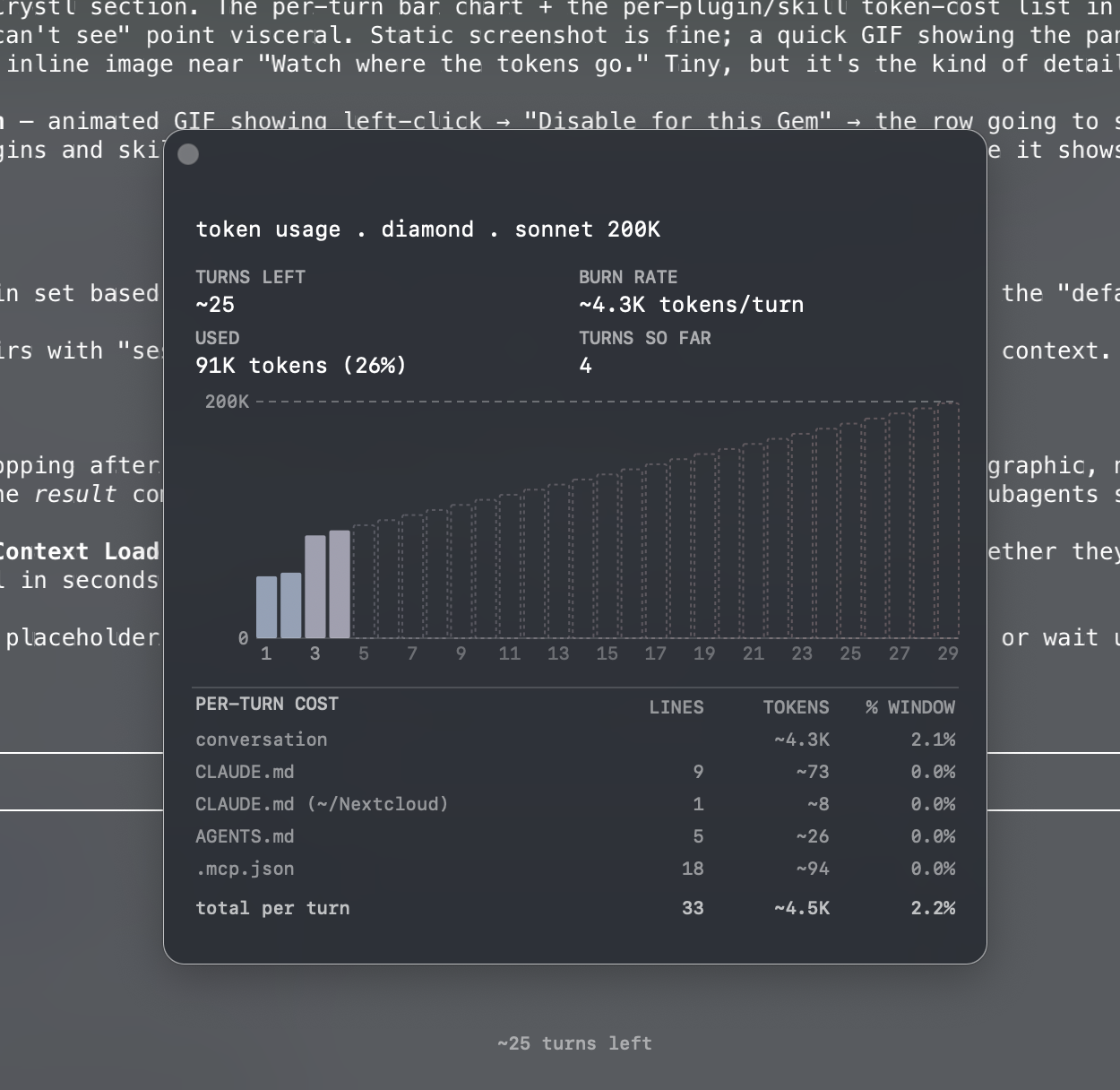
The breakdown almost always surprises people the first time. The conversation history is rarely the biggest line item. Far more often it’s the eager-load surface: every tool definition, every plugin manifest, every skill’s frontmatter, loaded on every single turn whether you use any of it or not.
Tactic 2: Compact deliberately, not reactively
Auto-compaction kicks in when you’re running out of room. By definition that means it fires under pressure, when the conversation is already crowded with detail it has to discard. The result is often a summary that loses something important.
Manual /compact around the 40-50% mark gives the model more room to write a good summary and more freedom about what to preserve. Use it before a natural break, like finishing a feature, switching subtasks, or stepping away, rather than as a panic button when the meter turns red.
/rewind is the underused complement. If a single turn blew up your context (reading a giant file, pulling a huge log), rewinding past it is often cleaner than trying to compact around it. You keep the thread, you lose the bloat, you move on.
Tactic 3: Use subagents for context isolation, not just delegation
Subagents (the Task tool, Explore, Plan, general-purpose) get framed as a way to parallelize work. That’s true but undersells them. The bigger win is context isolation.
A code review doesn’t need the full history of how the feature was designed. A test fixer doesn’t need the architecture discussion that came before it. When you delegate that work to a subagent, the subagent burns through its own context window doing the research, and only the result comes back into your main session. Your main thread stays lean.
Use subagents whenever a task can be specified clearly enough that you don’t need to see the agent’s intermediate work. Codebase exploration, “find all the places that do X,” running a self-contained investigation, gathering data for a decision: all good fits. The main session should hold the decisions, not the breadcrumbs that led to them.
Tactic 4: Sessions are branches, not feeds
A long-running session that’s been touching three different features is a session where every turn re-sends history from features two and three back into the prompt. That cost compounds. It’s why the same conversation feels sluggish on turn 80 even when the current task is trivial.
The fix is to treat sessions like git branches. New workstream, new session. Finish one thing, close it, start a fresh one for the next. The cost of context-switching between sessions is much lower than the cost of a single session that’s been accumulating irrelevant history for hours.
Tactic 5: Cut your standing overhead
Everything in the previous four tactics is about managing variable context, what enters and leaves the session as you work. The bigger, quieter optimization is your standing overhead: the stuff that loads on every turn, in every session, forever, until you turn it off.
That includes:
CLAUDE.mdfiles. Every line is a line you pay for on every turn. Keep them tight and project-specific. Move long-form documentation out of CLAUDE.md and into files the agent can read on demand.- MCP servers. Each connected server adds its full set of tool definitions to your prompt. If you’ve got Linear, GitHub, Postgres, Figma, and Sentry all wired up but you’re only touching code right now, you’re paying for four of them you aren’t using.
- Plugins and skills. These are the easy ones to overlook. Every installed plugin’s manifest and every skill’s frontmatter is eager-loaded on every turn, because that’s how the model knows what’s available to invoke. A clean install can be cheap. A year of “this looks useful, let me install it” usually isn’t.
The principle: default to disabled, opt back in. A lean global config you add to per-project is almost always cheaper than a heavy one you trim per-project, because the heavy one keeps growing whenever you forget.
A specific note on plugins and skills
Plugins and skills get singled out because they’re the part of the eager-load surface that grows the fastest in practice. Every new plugin you install adds its manifest. Every skill you write adds its frontmatter. None of it is optional per turn. It all ships on every request so the model knows what exists to use.
The right hygiene is project-aware:
- A Next.js on Vercel project doesn’t need Shopify, Cloudflare, or Supabase plugins loaded.
- A Swift project doesn’t need any web-stack plugins loaded.
- A backend-only repo doesn’t need design or storefront skills loaded.
For most developers, walking through ~/.claude/plugins/ and ~/.claude/skills/ once a month and asking “do I actually use this in this project?” reclaims more context than any number of /compact calls.
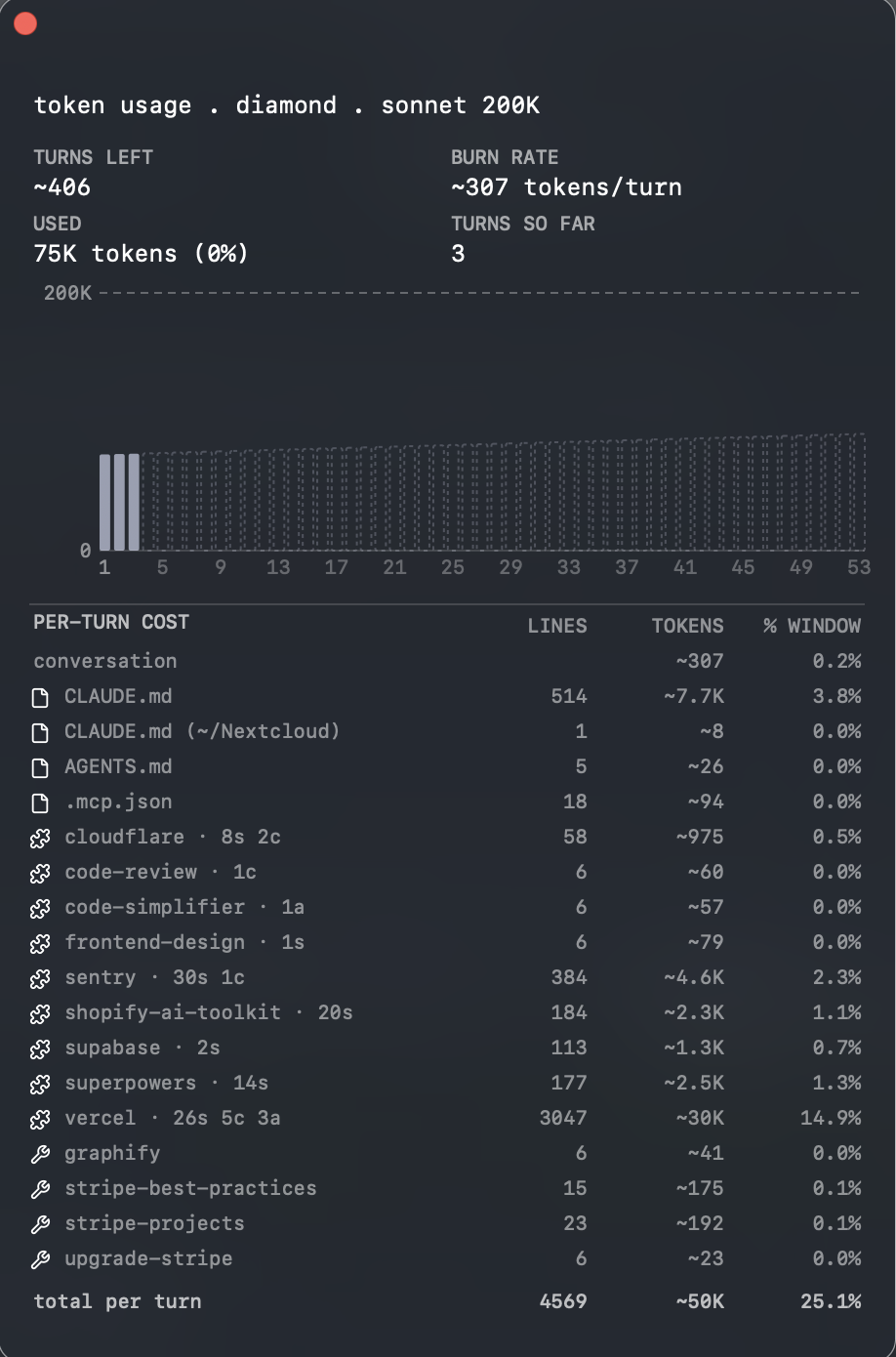
This is what most installs look like after a few months of “let me try this one.” The vercel plugin in the shot above is eating more than the entire conversation history combined. Sentry adds another 4.6K. Shopify, supabase, superpowers: each one a few percent that adds up. None of them are wrong to have installed; they’re just wrong to leave loaded on a project that doesn’t use them.
The mechanics of fixing this are straightforward but tedious: flipping enabledPlugins.<id>: false in .claude/settings.json, then remembering which projects you set what for. This is the work that pays off but never feels like progress, which is why most people don’t do it.
How crystl helps with the parts most people skip
crystl is a macOS terminal built specifically for agentic workflows like Claude Code, and the context-management surfaces are some of the features that get the most use day to day.
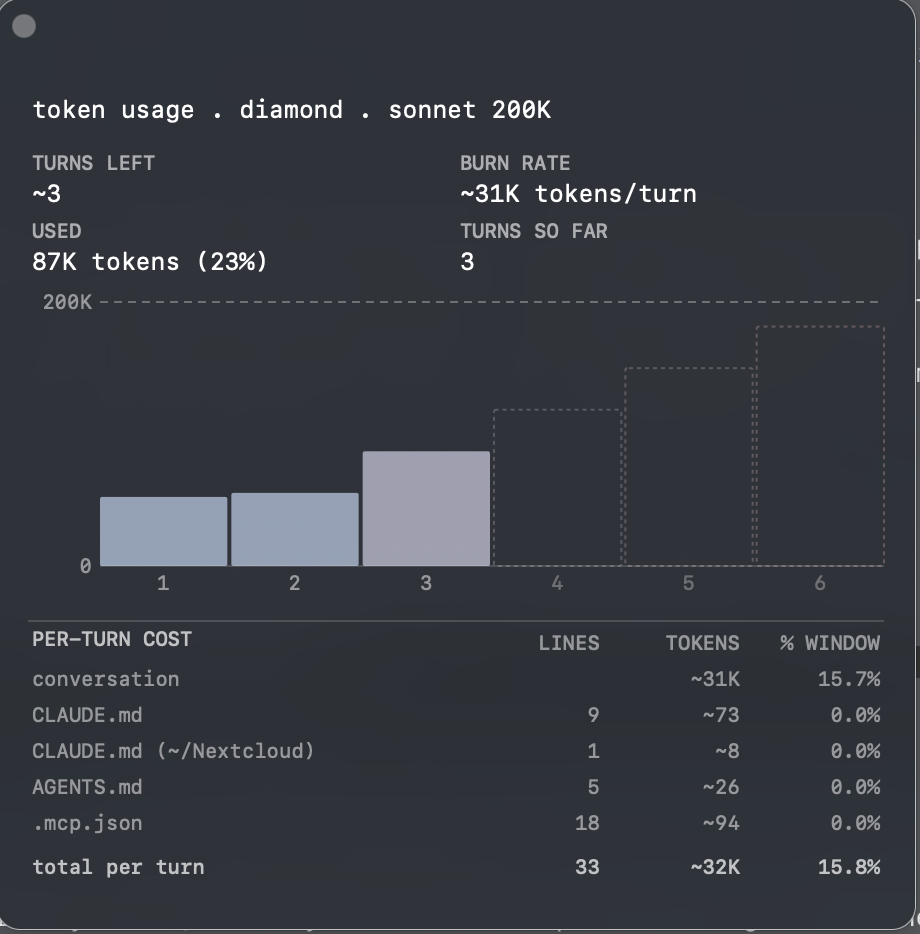
Context Load Tracking sits in the status bar of every shard. After three turns, you get a live ~N turns left estimate based on the shard’s actual burn rate: not a generic warning, but a real projection from the tokens you’ve actually been spending. Click it and a panel breaks down per-turn token usage, input vs. output split, model context window size, and the part that matters here, the token cost of every plugin and skill currently loaded.
That last column is the one you can’t easily get elsewhere. crystl scans ~/.claude/plugins/ and ~/.claude/skills/ (or ~/.codex/ if you’re on Codex), measures the token weight of each one’s manifest or frontmatter, and shows you exactly which entries are expensive. Sort by cost, find the heavy ones, and you have an answer to “what should I disable” that’s based on actual measurement instead of guessing.
Per-gem plugin and skill scoping is the other half. Each gem (project) in crystl gets its own scoped config, so you can leave the Shopify plugin enabled globally but disable it for your Vercel project, or keep the Swift LSP skill on only in your iOS gem. Left-click a row in the context panel and pick Disable for this Gem or Disable for all Gems. crystl writes the change to <gem>/.claude/settings.json, then injects /reload-plugins into the running shard so the change takes effect mid-session without a restart.
When you create a new gem, crystl auto-detects the stack (vercel.json, wrangler.toml, Package.swift, etc.) and proposes a tailored plugin set before the gem is saved. The default isn’t “load everything.” It’s “load what this project actually needs.”
The combination means the manual hygiene most people skip, auditing plugins and skills, scoping them per project, and measuring their cost, becomes a one-click loop instead of a quarterly chore.
The throughline
Context is a budget you spend on signal. The reason all of this advice converges is that almost every optimization is a different way of removing noise: variable noise through compaction, subagents, and shorter sessions; standing noise through trimmed memory files, fewer MCP servers, and lean plugin and skill configs.
Bigger windows make some of this slack easier to absorb, but they don’t change the underlying physics. The session where you’ve been disciplined about what enters the context will always outperform the session where you haven’t, regardless of which model you’re running.
Watch the meter. Cut what you don’t use. Send research out to subagents. Start a new session when the work changes. The model will get most of the way there on its own, but only if you give it room to think.